
By Russell Kommer, CEO of eSoftware Associates (ESW). Last updated November 4, 2026
Every company has a few people whose calendar is the real bottleneck. A CFO gets pinged about a vendor discount. A COO gets asked, again, whether a schedule change needs sign off. Most of those questions have answers the executive has given a dozen times before, using the same criteria every time.
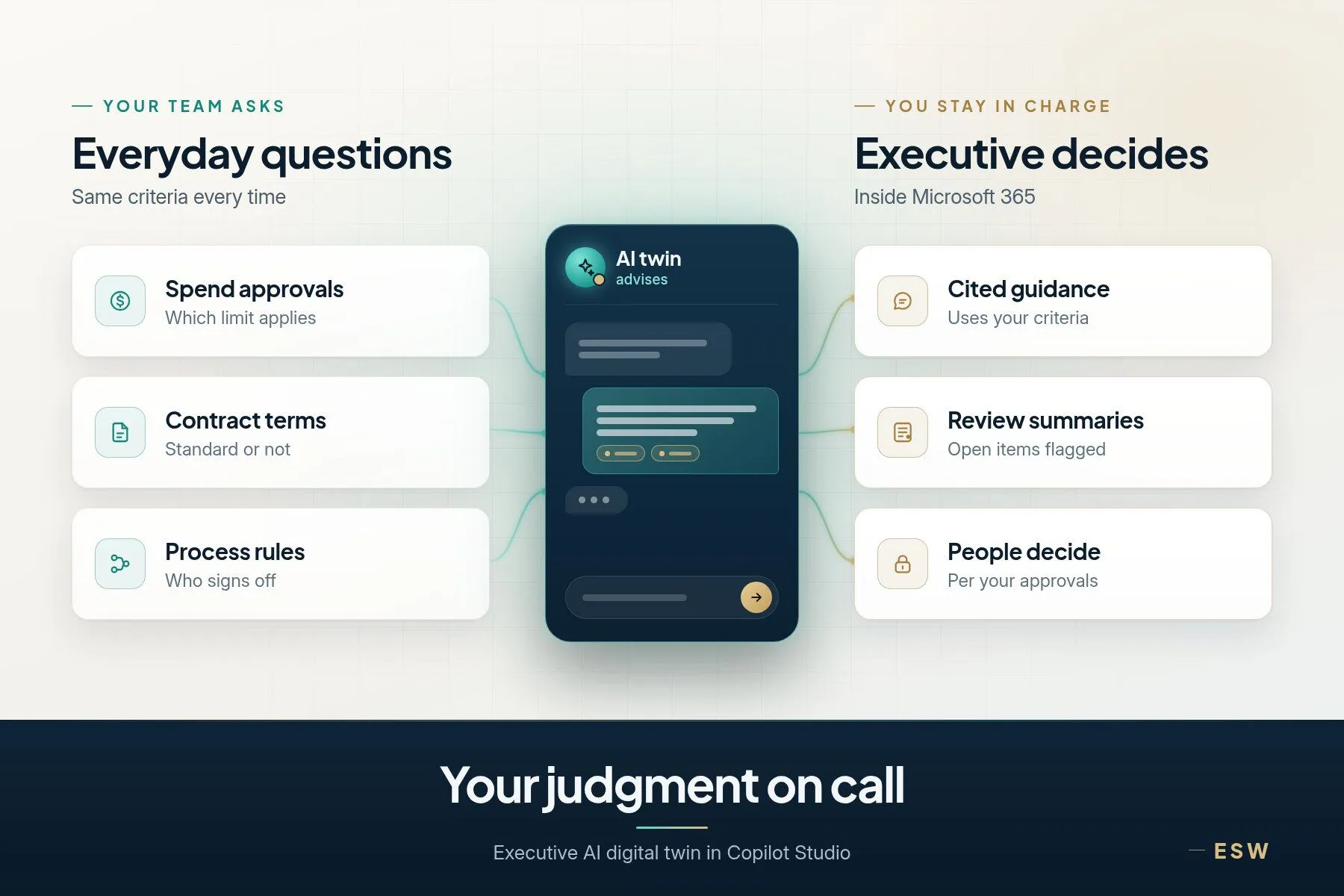
An executive AI digital twin puts that judgment where people can reach it. In most cases it’s a Copilot Studio agent. It draws on one leader’s knowledge, past decisions and decision rules. Employees ask it for guidance, it summarizes those conversations for the executive, and the executive’s feedback makes it sharper. It advises. It never decides. Our Copilot Studio consulting team builds them inside Microsoft 365.
Key takeaways
- An executive AI digital twin is a Copilot agent, usually built in Copilot Studio, grounded in one leader’s knowledge, past decisions and decision criteria.
- It gives guidance only. Decision authority stays with people, under the delegation of authority your board approved.
- It runs inside Microsoft 365, so it follows the permissions and security you already have.
- The executive reviews summaries of what people asked and corrects the twin, so it gets better with use.
- Start with one executive and one decision area, measure it, then expand.
What is an executive AI digital twin?
An executive AI digital twin is an AI agent that answers questions the way a specific leader would, based on that leader’s documented knowledge, past decisions and the criteria they use.
The term “AI twin” gets used loosely. Search for it and you’ll find video avatars and voice clones that copy how a person looks or sounds. In engineering, digital twin AI usually means a live model of a machine or plant. An executive twin is neither. It copies how a person reasons about a specific set of business questions, and it shows its work. It doesn’t pretend to be the executive. It tells the employee what the executive’s criteria say, cites the source, and flags when a question needs the real person.
Why do executives become the bottleneck?
Because a lot of good judgment lives in one head. Over years, a CFO builds rules of thumb about payment terms, discount approvals and when a spend request needs a second look. A general counsel knows which contract changes are routine and which ones aren’t. Those rules are rarely written down in one place.
So people ask. Each takes a few minutes, but they arrive all day and break up focused work. Meanwhile the employee waits. Some stop asking and guess, which is worse.
I’ve watched this pattern in companies of every size. The fix isn’t to make the executive more available. It’s to make their thinking more available, with clear limits on what that means.
How does an executive AI digital twin work in Microsoft 365?
The twin is grounded in three kinds of material. Grounding means the agent answers from sources you choose instead of from the open internet.
| What it learns from | Examples | Who keeps it current |
|---|---|---|
| Knowledge sources | Policies, playbooks, board decks, approved memos in SharePoint | The executive’s office |
| Historical decisions | Past approvals and denials, with the reason given | The executive, with an assistant or analyst |
| Decision criteria | Thresholds, rules of thumb, red flags written out plainly | The executive, reviewed each quarter |
In most Microsoft 365 companies, we’d expect to build it in Copilot Studio, published to Teams where people already work. We confirm the build during discovery. If you’re not sure how Copilot Studio differs from the Copilot already in your apps, this comparison is a good place to start.
Security is the part executives ask about first. A twin built this way inherits your Microsoft 365 permissions. Microsoft’s documentation says an agent using SharePoint as a knowledge source only surfaces content the signed in user already has permission to see. If your permissions are loose, the twin will be too, so fix oversharing before you load anything sensitive.
How does an AI digital twin learn from the executive’s feedback?
The twin improves through a structured loop. It captures each conversation. On a set schedule, the executive gets one consolidated summary that groups what people asked into three parts.
- Key issues. The topics that came up most and anything unusual.
- Recommendations given. What the twin told people and which criteria it used.
- Open decisions. Questions the twin handed back because they need the executive.
The executive marks each recommendation as right, partly right or wrong, and says why. Those notes become new or sharper criteria, and we update the twin’s knowledge to match. Don’t count on the default logs for this. Copilot Studio does keep session transcripts, but Microsoft notes that answers drawn from SharePoint knowledge are redacted in them and that transcript data is kept for a limited time. So we design the summary step on purpose.
I think this loop matters more than the agent itself. A twin that nobody reviews drifts. A twin its executive reviews for a few minutes each cycle turns into a better record of how that person thinks than any onboarding binder.
Can an AI digital twin make decisions?
No, and it shouldn’t. We design these agents to be advisory, never autonomous. The twin explains what the criteria point to. A person makes the call.
That’s human in the loop AI in its plainest form. Any real decision authority has to follow your board approved delegation of authority. The twin can tell a buyer that a purchase looks like it falls under their own approval limit. It can’t approve the purchase, and it should say so every time.
We set three things in writing before the build starts.
- Scope. Which questions the twin answers and which ones it always hands back.
- Accuracy expectations. How often its guidance has to match the executive’s own answer during the pilot, and who checks.
- Governance. Who owns the knowledge sources, who can change the criteria, and how conversations are stored.
Frameworks like the NIST AI Risk Management Framework are useful for shaping that governance. If you’re also looking at agents that act on their own, our post on autonomous Copilot Studio agents covers the controls those need.
Which executives get the most from an AI digital twin?
Any leader who answers the same kinds of questions over and over, using criteria they could write down. These are the Copilot Studio use cases where AI for executives fits best.
| Role | Questions the twin can field | Where it hands back |
|---|---|---|
| CFO | Payment terms, discount approvals, which budget a cost belongs to | Anything above an approval limit or outside policy |
| COO | Scheduling rules, vendor escalations, which process applies | Changes that affect safety, staffing or customers |
| General counsel | Which contract clauses are standard, when legal review is needed | Any actual legal advice or negotiation position |
| CEO | Strategic priorities, how to frame a message, who owns a decision | Anything involving the board, a deal or a hire |
AI for CFOs is often the easiest place to start, since finance already runs on thresholds and policy. The same pattern works for companies across industries, wherever an executive’s judgment follows criteria and people wait on it.
How do you start an executive AI digital twin pilot?
Start narrow. Pick one executive and one decision area, such as spend approval questions or contract review triage. Load only the knowledge that area needs and pilot it with a small group.
Judge the pilot on four plain checks.
- People got useful answers faster than before.
- The executive agreed with the twin’s guidance often enough to trust it.
- It handed back the questions that needed the real person.
- The summaries were worth the executive’s time to read.
If those hold, add the next decision area or the next executive. If not, fix the criteria first. People will use a small twin they trust long before a broad one they don’t. It’s the same discipline behind good AI knowledge management, applied to one leader’s thinking.
How to choose a Copilot Studio partner for an executive AI digital twin
Building the agent is the easy part. Capturing an executive’s judgment, protecting it and keeping it accurate is the hard part. Look for these five things.
- Deep Microsoft 365 experience. The twin lives on SharePoint, Teams, Entra ID and your permissions. We’ve been Microsoft specialists since 2006.
- Governance before the build. Ask how they’ll set scope, accuracy expectations and decision limits. If the first meeting is a demo, keep looking.
- A team you’d trust with executive knowledge. You work directly with the consultants who design and build it.
- Training and adoption. Employees need to know what to ask and when to go to the real person. Our AI adoption and change management work and Copilot Ascend™ training cover that.
- Support after launch. Someone has to run the feedback loop. Our Copilot Orbit™ managed service gives that loop an owner after launch.
That approach has served more than 1,500 clients. To see how we design and govern agents like this, visit our Copilot Studio consulting page or our broader Microsoft Copilot and AI agents services.
Frequently asked questions
Does an executive AI digital twin make decisions on its own?
No. An executive AI digital twin gives advice only. It explains what the executive’s criteria and past decisions suggest, and it hands any real decision back to a person. Decision authority stays with people under the delegation of authority your board approved. The twin should state that limit plainly whenever a question moves toward an approval.
How is an executive AI digital twin different from Microsoft 365 Copilot or a general assistant?
An executive AI digital twin is narrower and more personal. Microsoft 365 Copilot and general assistants help anyone draft, summarize and search across the content they can access. A twin answers one leader’s recurring questions from that leader’s approved knowledge, past decisions and criteria. It hands back anything outside its scope and improves through the executive’s own review.
What information does an executive AI digital twin learn from?
An AI digital twin learns from three sources the executive approves. The first is knowledge like policies, playbooks and memos. The second is historical decisions with the reasons behind them. The third is written decision criteria such as thresholds and red flags. It answers from those sources only, and the executive’s feedback on its guidance keeps them current over time.
Who can see the information in an executive AI digital twin?
An AI digital twin built inside Microsoft 365 follows the permissions you already have. For SharePoint knowledge, it only shows content the person asking is allowed to see. That makes permissions cleanup important before launch. Sensitive material should sit in locations with tight access, and the conversation records should have a named owner.
How do you keep an executive AI digital twin accurate?
The executive reviews a regular summary of the questions people asked, the guidance the twin gave and the decisions it handed back. They mark each answer as right, partly right or wrong and explain why. Those notes turn into sharper criteria and updated knowledge. A few minutes of review each cycle keeps the twin close to how the executive thinks.
How should a company start with an executive AI digital twin?
Start with one executive and one decision area where questions repeat and the criteria can be written down. Agree on scope, accuracy expectations and governance first. Run a short pilot with a small group, compare the twin’s guidance with the executive’s own answers, then expand only after the results hold up.
Put your best judgment where your team can reach it
An executive AI digital twin won’t replace a leader. It gives people the answer the leader would likely give and leaves every decision with people. If you want to scope a pilot, our Copilot Studio consulting team can help you pick the right executive and decision area. Book a consultation with our team.
About the author. Russell Kommer is CEO of eSoftware Associates (ESW). Since 2006 ESW has worked with 1,500+ clients, delivered 1,000+ projects and trained 10,000+ employees on Microsoft tools.